QMK / VialWiredHot-swap

Keyboards

Lily58 Choc Keyboard

€215.00VAT included
  • Hand-built to order in France
  • Ships in 3–5 business days
  • 30-day returns

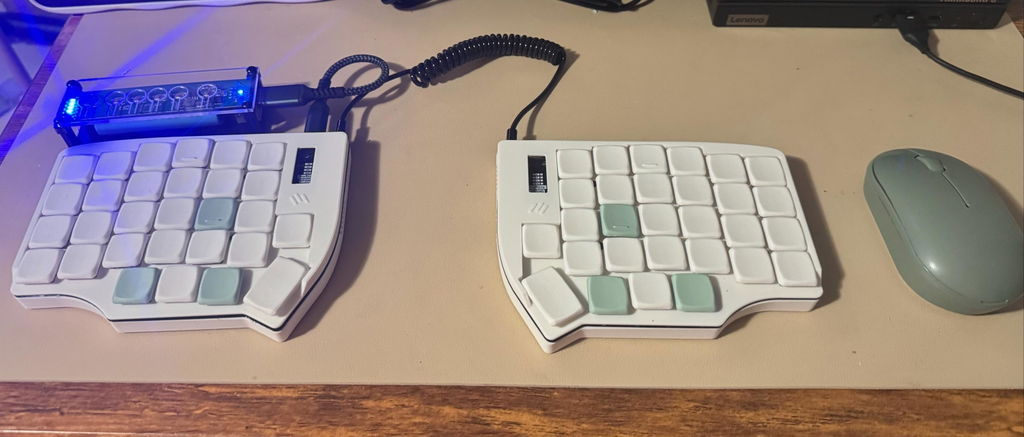
A 58-key split with a number row and a tight thumb cluster. The bridge between a standard 60% and an ergonomic split.

Fully customizable colors, from the case to each keycap. Sound-dampened case and hot-swap sockets.

Build your keyboard

Choose your color scheme

Current scheme: Classical

Connection Type

Display

Switches

TRRS cable color

Optional extras

Add to your order

Accessories that pair with this keyboard. Each one ships together with it.

  • €44.00€49.00€5.00 off with this keyboardDetails
  • €34.00€39.00€5.00 off with this keyboardDetails
  • €5.00Details
  • €5.00Details

Customize your product

0 / 250
€215.00VAT included
1

Product details

  • 58 keys
  • Number row
  • Hot-swap Choc v1
  • OLED option
  • Wired or wireless
  • QMK / ZMK
Description

The Lily58 is a 58-key split ergonomic keyboard, built by hand in France with fully customizable colors, from the case to each individual keycap. It keeps the full number row on the base layer of a column-staggered layout, so digits and symbols don't need a layer hold. It's the original design the Sofle was forked from: same key count, a tighter thumb cluster and no rotary encoders.

It arrives assembled, flashed and tested. A TPU sound-dampening layer inside the case makes typing softer and quieter, especially with the optional Kailh Choc Red Pro linear switches: smooth, with no click or bump. Hot-swap sockets let you change switches anytime without soldering, so you can also order it without switches and fit your own Kailh Choc v1.

Built to order: ships from France within 3 to 5 business days, with 30-day returns. Based on the open-source Lily58 by kata0510.

Specifications
Layout4×6 + 5 thumb keys per half, column-staggered, fully split
Keys5829 per half
Key spacingMX, 19.05 × 19.05 mm
Switch socketsKailh Choc v1 hot-swapChoc v2 not compatible
Stock switchesKailh Choc Red Pro, linear, 35 gfOptional. Order without switches to fit your own.
Keycaps3D-printed Choc profile, color selectable per key
CaseFDM-printed, TheKeebLab design, color of your choiceTPU sound-dampening layer, lateral vents. FDM printing can leave minor surface marks.
ControllerRP2040 (wired) · nRF52840 (wireless)
FirmwareQMK with Vial (wired) · ZMK with ZMK Studio (wireless)
ConnectionUSB-C to host, TRRS between halves (wired) · Bluetooth LE, USB-C charging (wireless)
Battery2 × 1000 mAh rechargeable, one per halfWireless build only
DisplayDual 128×32 OLED, one per halfOptional on the wired build, always included on the wireless build
CompatibilityWindows, macOS, Linux, Android, iOS
Based onLily58 by kata0510
What's in the box
  • Lily58 Choc Keyboard, both halves, assembled, flashed and tested
  • TRRS cable in your chosen color

Not included: USB-C cable

Frequently asked questions

Firmware & downloads

Quick-start guides and firmware for every build. Your keyboard ships with the right firmware already flashed: download it again here to reflash, reset, or return to the default layout.

Guides

  • Wireless quick-start guide

    Pairing, screens, layers and remapping with ZMK Studio.

    Read onlinePDF

Wired — Pro Micro RP2040QMK / Vial

One file for both halves. Hold BOOT while plugging in a half (or double-tap reset) so it mounts as the RPI-RP2 drive, copy the .uf2 onto it, then do the same on the other half. Edit the keymap live in the Vial web app, no compiling. To go back to the default keymap, assign EE_CLR (Clear EEPROM) to a key in Vial and press it.

  • 86 kB

    lily58-thekeeblab-vial.uf2

    Vial enabled, one file for both halves.

Wireless — Pro Micro nRF52840ZMK

Double-tap reset on a half so it mounts as the NICENANO drive, copy its .uf2, then do the same on the other half. Edit the keymap live with ZMK Studio over USB. If the halves stop talking to each other, flash the settings-reset file on both, then the normal firmware again.

  • 478 kB

    lily58-thekeeblab-zmk.zip

    Left and right .uf2, ZMK Studio enabled (the settings-reset file is in the zip too).

  • 91 kB

    lily58-thekeeblab-zmk-settings-reset.uf2

    Clears Bluetooth pairing and stored settings on a half. Flash on both halves, then flash the normal firmware again.

Reviews